Last updated: October 2026
A deleted iPhone photo stays in Recently Deleted for 30 days, where your passcode still opens it. To delete it permanently, delete it twice. In ArkWarden, private photos are encrypted from the moment they enter the vault. With Trash off, which is the default, deleting one removes it at once, with no 30-day album and no copy on an ArkWarden server.
To permanently delete a photo on iPhone, delete it in Photos, then delete it again in Recently Deleted. Open Collections, scroll to Utilities, open Recently Deleted, unlock it, tap the photo, tap Delete and confirm. After the second delete, the photo cannot be recovered in Photos, and with iCloud Photos on, it leaves your other devices too. For photos you want to keep private and out of Photos, store them in ArkWarden, where delete is final when Trash is off, which is the default.
The first delete moves a photo out of your library and into Recently Deleted. Videos work the same way.
The message above the button depends on iCloud Photos. With iCloud Photos off, it reads: "This photo will be deleted from the library. It will be in Recently Deleted for 30 days."
Deleting a photo from Recently Deleted removes it permanently. Apple states you cannot get it back in Photos after that.
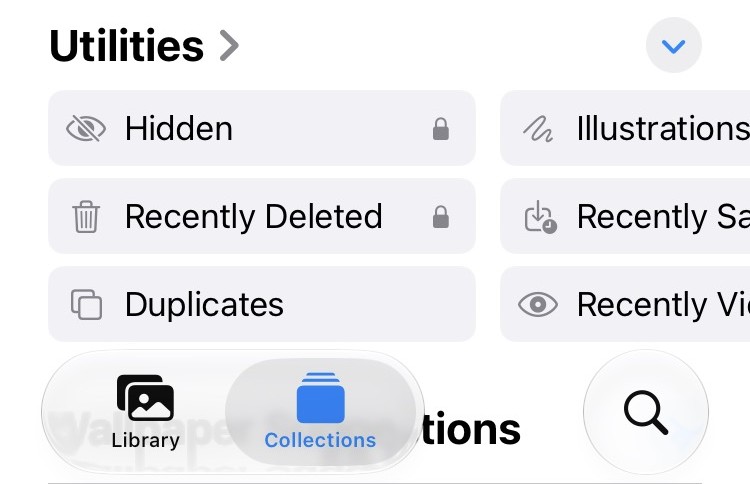
Recently Deleted sits under Utilities, with a lock icon. iOS 27.
The same More menu also has Recover All. For a Shared Library photo you added, Apple names the confirmation Delete Photos I Added.
With Trash off, which is the default, deleting a file in ArkWarden removes it from your iPhone at once. There is no 30-day album, no Recover button and no copy on an ArkWarden server, so ArkWarden has no copy to restore.
The files are encrypted from the start. ArkWarden encrypts each photo, video, document and audio file on your iPhone with AES-256-GCM, and the vault opens with a pattern you draw, not your iPhone passcode. For how other vault apps handle encryption, see photo vault apps compared.
Write down the recovery phrase. There is no ArkWarden account to create.
Photos and videos taken with the built-in camera are saved directly in the vault and are never saved in the camera roll. For photos already in Photos, import them, match the count, then open the imported files. Opening one file does not prove the rest imported. Only then delete the originals with Step 1 and Step 2 above. Documents from the Files app can be imported into vault folders the same way.
Tap Delete on a file. With Trash off, the file is removed from your iPhone at once.
| iPhone Photos | ArkWarden | |
|---|---|---|
After you delete |
30 days in Recently Deleted |
Removed at once (Trash off by default) |
Who can open deleted items |
Anyone with Face ID, Touch ID or the passcode |
Nobody on this iPhone. The file is removed (Trash off) |
Encryption |
Data Protection encrypts files on the device. Photos does not add a separate vault key. Full comparison |
AES-256-GCM under a key your pattern unlocks, not the device passcode |
Account or company server |
Apple Account, and iCloud Photos if it is on |
No ArkWarden account or ArkWarden server |
Turn on Trash in ArkWarden's Settings. Deleted files then stay encrypted on your iPhone for 7 days. You can recover them, or delete them before the 7 days end. Files in Trash are never included in backups.
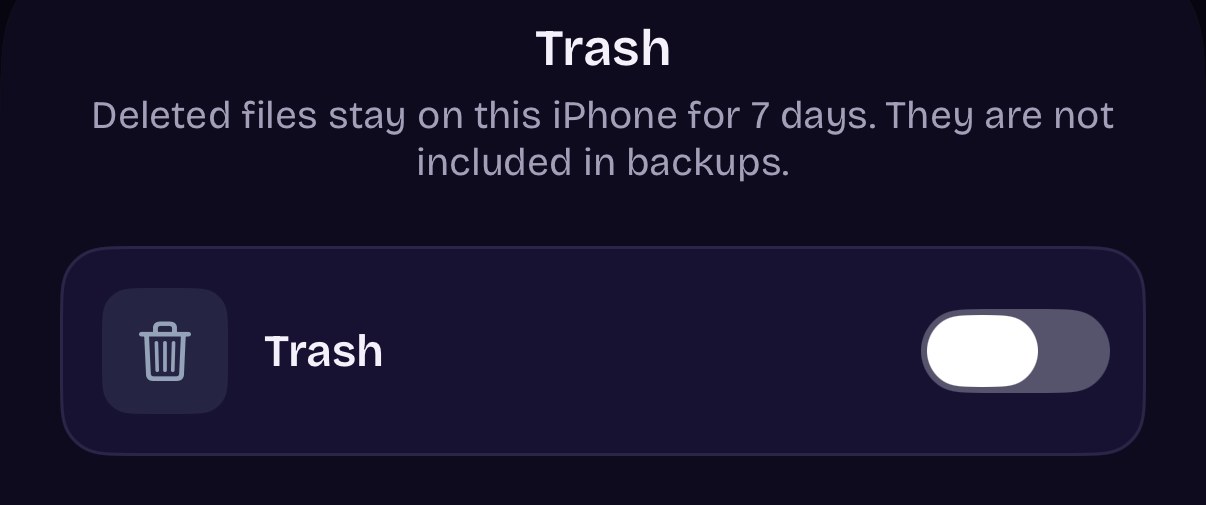
ArkWarden Settings, Trash. Off by default.
iPhone keeps deleted photos and videos in Recently Deleted for 30 days, then deletes them permanently on its own.
Each photo in the album shows how many days it has left. Until then, anyone who can open the album can view or recover the photo. Deleting it yourself is the only way to remove it the same day.
With iCloud Photos turned on, a photo you delete on iPhone is deleted on every device signed in to the same Apple Account.
To check whether iCloud Photos is on, open Settings, tap Apps, then Photos. The same switch is also under Settings, your name, iCloud, Photos.
ArkWarden works differently with iCloud. Its optional encrypted backup is off by default. When you turn it on, the vault is encrypted on your iPhone before it reaches your own iCloud, and only your recovery phrase opens it. Hidden photos follow Apple's rules, which Do hidden photos sync to iCloud? explains.
Photos synced from a computer and photos in a Shared Library follow different rules.
A gray Trash button usually means the photo was synced to the iPhone from a computer. To remove it, stop syncing that album or folder from the computer in Finder or iTunes, then sync again.
Deleting from Photos and Recently Deleted removes the photo from your library. Copies made before that are separate files.
Recently Deleted is locked by default and opens with Face ID, Touch ID or the iPhone passcode. Anyone who knows your passcode can open it.
The lock is also optional. In Photos settings, the switch is named Use Face ID, Use Touch ID or Use Passcode, depending on your iPhone. Apple states that turning it off unlocks both Recently Deleted and Hidden.
Apple uses the same lock for the Hidden album. How to find hidden photos on iPhone shows where that album is and who can open it, and locking the Photos app adds one more step before anyone reaches either album. ArkWarden opens with your pattern instead, so the passcode alone does not open it. To keep a photo out of sight instead of deleting it, compare the ways to hide photos on iPhone.
iPhone steps were checked on iOS 27 with iCloud Photos off, in October 2026. Other claims come from Apple's current documentation and the ArkWarden app.
Every file encrypted on your device, opened by a pattern you draw. Trash is off by default. No account, no ads, no server.