Recovery words
for your vault.
When you create a vault, ArkWarden generates a sequence of plain English words, twelve by default, or twenty-four if you want extra security. Write them down. Keep them somewhere safe. If you forget your pattern, or move to a new iPhone, enter those words on the unlock screen to regain access. There is no other recovery path, by design.
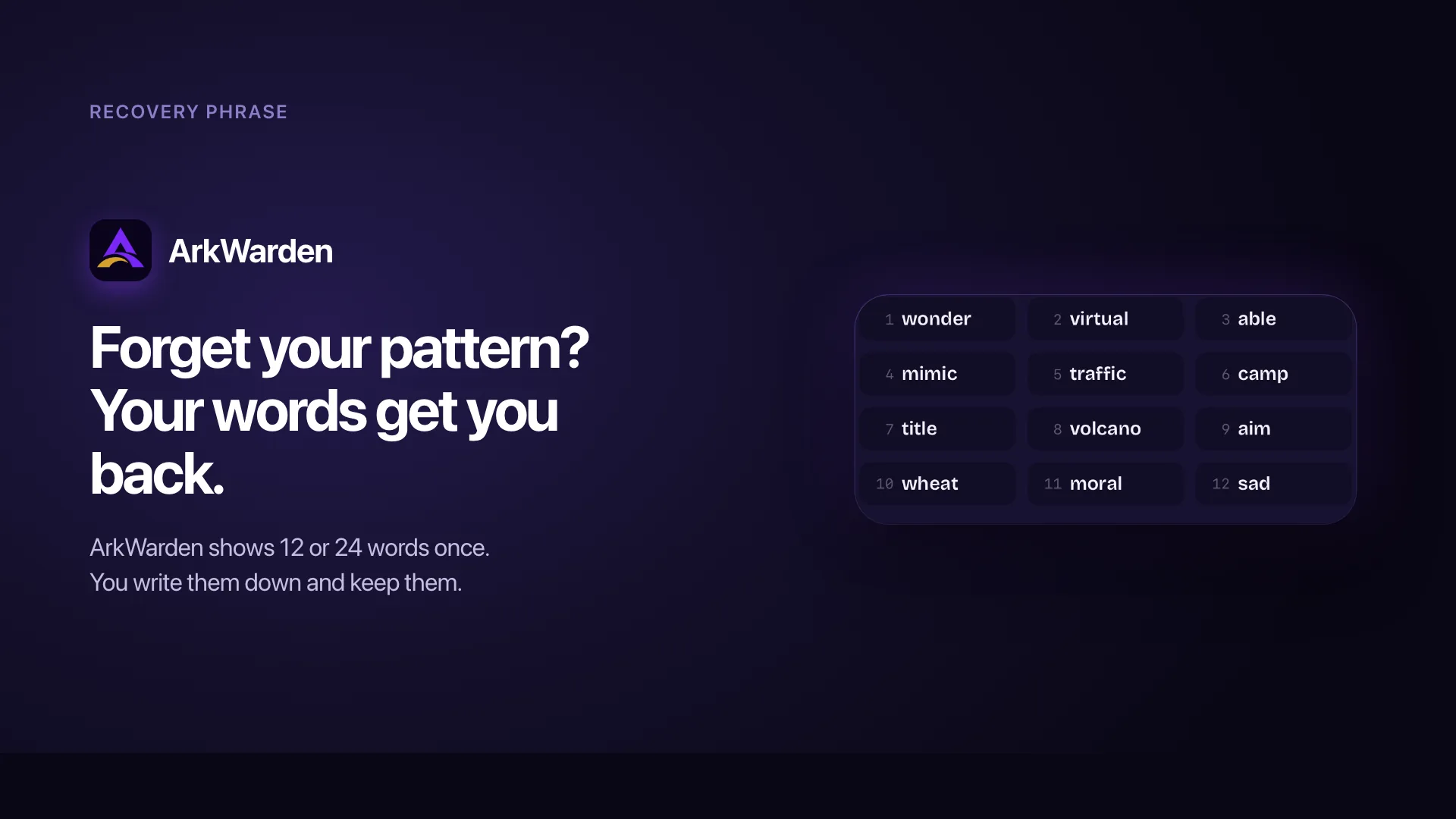
Your recovery phrase. Generated on device. Shown once.
From a list of words to an unlocked vault.
Your recovery phrase is not a second password. It unlocks the same master key as your pattern. Pattern unlock also needs your iPhone's Secure Enclave. Your phrase does not, so it can restore your vault on a new phone.
ArkWarden generates your phrase
When you set up your vault, ArkWarden picks words from the BIP-39 English wordlist using the iPhone's secure random number source. The list contains 2048 carefully chosen words, designed to avoid look-alikes and easy misspellings. Your phrase is twelve words long by default. You can choose twenty-four words during setup if you want a longer backup phrase and extra security.
The words are not your password. They are the human-readable form of cryptographic randomness. The same words, in the same order, always produce the same key. A different order produces a different key. Two missing words produce a key that opens nothing.
ArkWarden shows the phrase, once
The phrase appears on screen during onboarding, with each word numbered and clearly readable. ArkWarden gives you time to write it down, then asks you to confirm you have saved it before continuing. Once you leave that screen, the phrase is no longer shown anywhere in the app.
What we keep on your device after that screen is the master key encrypted under the key derived from the phrase. The words themselves are not written to disk by ArkWarden. The plaintext phrase exists in memory only for the moment it is on screen, and it is released as soon as the screen closes, unless you choose to export or download a copy yourself.
The recovery phrase unlocks the same vault as your pattern.
If you forget your pattern, tap "Use Recovery Phrase" and enter your words. If the words are correct, your vault opens.
There is no server involved. Typos are flagged as you type, since each word is checked against the BIP-39 wordlist, but ArkWarden does not tell you which words are wrong for your specific vault. The words either open the vault or they do not.
You set a new pattern and continue
Once you are back inside, ArkWarden guides you through setting a new pattern. The new pattern encrypts the same master key again. Your files are not re-encrypted, because the master key has not changed. Only the way you access it every day is new. Your existing recovery phrase keeps working. From the next unlock onward, you draw the new pattern.
Why a backup phrase is not the same as a forgotten password link.
Most apps fix forgotten credentials with an email link or a phone-number reset. Each of those is convenient because the company holds something on your behalf. The tradeoff is that any system that can recover your account can also be breached or legally required to recover it for someone else. ArkWarden gives the recovery method only to you.
| "Forgot password" email | Security question | Cloud account recovery | ArkWarden recovery phrase | |
|---|---|---|---|---|
| Who holds the recovery secret | The company | The company | The cloud provider | You. Only you. |
| Can the company recover the data? | Yes | Yes | Often yes | No. There are no ArkWarden servers. |
| Can a stolen mailbox unlock your data? | Yes | Sometimes | Yes | No |
| Can a court order produce a copy? | Yes | Sometimes | Yes | No. ArkWarden has no files to provide. |
| Where the phrase is stored | The provider's database | The provider's database | The provider's keystore | On the paper you wrote it on |
The phrase gives you control of your own recovery.
The recovery phrase exists because ArkWarden has no master key on a server, no support reset, and no email-based reset path. This is a direct consequence of on-device privacy. The tradeoff is that if you ever lose both your pattern and your phrase, the vault cannot be recovered, by anyone. Because the phrase is never stored anywhere, only the person who wrote it down can use it.
Your pattern and your phrase open the same vault.
Your pattern and your phrase both open the same vault. They unlock the same master key in different ways. Pattern unlock is tied to your current iPhone. Your phrase is how you restore on a new one. Changing your pattern does not invalidate your phrase, and your phrase still works after you reset your pattern.
Twelve words or twenty-four: both are secure.
Both 12-word and 24-word recovery phrases are extremely secure. A 12-word phrase already provides 128 bits of entropy, which is considered more than sufficient against brute-force attacks. A 24-word phrase doubles the entropy to 256 bits and offers an additional security margin. If you prefer something shorter and easier to back up, 12 words are an excellent choice.
What the phrase actually encodes, and where it is stored.
The recovery phrase is built on a public, audited standard with a long record of use outside ArkWarden. Here is how the parts work together.
The standard: BIP-39
BIP-39 is the recovery phrase format introduced for Bitcoin wallets and used today across most modern hardware wallets. It defines a wordlist of 2048 English words, hand-picked to be unambiguous and easy to write. ArkWarden uses this wordlist and its entropy convention: 12 words carry 128 bits of randomness, 24 words carry 256 bits.
ArkWarden builds your phrase from the official BIP-39 English wordlist, using the iPhone's secure random source. Twelve words give you 128 bits of entropy, twenty-four words give you 256 bits.
What happens when you enter your phrase to unlock
| Step | What ArkWarden does |
|---|---|
| 1 | Reads the words you typed, lowercased and trimmed |
| 2 | Joins them into a canonical string ("word1 word2 word3 ...") |
| 3 | Runs PBKDF2 against that string and your vault's per-vault salt |
| 4 | Uses the resulting key to attempt authenticated decryption of the phrase-encrypted master key in your iOS Keychain |
| 5 | If the unwrap succeeds, the master key is back in memory and your vault opens |
| 6 | If it fails, nothing is exposed. The screen tells you the words did not unlock the vault, and you can try again |
What is and is not stored on your device
| Item | Stored on device? | Where |
|---|---|---|
| The words of your phrase | No | Not in the app itself. Not in iCloud, not in any backup. Exporting or downloading a copy is your responsibility to manage. |
| The encrypted master key for the phrase path | Yes | iOS Keychain, device-only storage |
| The encrypted master key for the pattern path | Yes | iOS Keychain, device-only storage. Pattern unlock also needs the Secure Enclave key on that iPhone. |
| Any hash of your phrase | No | Not stored |
Per-word feedback as you type
The recovery screen validates each word against the BIP-39 wordlist as you type. Words that are not in the list get a red border immediately, so you can fix typos before you finish entering all twelve or twenty-four words. The check is purely UI feedback and tells nothing about which key your phrase will produce. The vault unlock decision still happens through authenticated decryption of the master key.
Regenerating your phrase
ArkWarden lets you generate a new phrase at any time, from Settings. The process is:
- ArkWarden warns you that the current phrase will stop working.
- You re-authenticate by drawing your current pattern, so someone with brief access to an unlocked phone cannot change your phrase without you knowing.
- ArkWarden generates a new phrase and shows it once.
- You confirm you have saved it, and the old phrase-encrypted key is replaced.
The previous phrase no longer unlocks the vault. Your pattern continues to work, your files are unchanged, and the master key inside is the same.
Store it somewhere safe. If you lose it, it cannot be recovered.
The recovery phrase is the most sensitive piece of information attached to your vault. Anyone who has it, in the right order, can unlock your master key and open your files. It is also the only way to move your vault to a new iPhone.
Do
- Write it on paper, by hand, with a permanent pen. Number each word. Cross-check the spelling against the word on screen.
- Keep it somewhere private and dry. A drawer that only you open, a small home safe, or a bank safety deposit box if your risk level requires it.
- Label each backup clearly if you regenerate your phrase. Old, invalidated phrases should be destroyed.
- Consider a more durable material for long-term storage. Steel backup plates designed for crypto seed phrases work with ArkWarden phrases too, since the format is the same.
- Decide now who should have access under specific circumstances. A closed envelope with your estate documents is a common option.
Avoid
- Typing the phrase into any app other than the ArkWarden recovery screen. Notes, password managers, email drafts, screenshots. All create copies in places not under your direct control.
- Storing the phrase in the same place as the device that uses it. A phrase taped to the back of the iPhone removes the protection that separate storage provides.
- Saying the phrase out loud near smart speakers or recording devices. Treat the phrase with the same care as a credit card number read aloud.
- Sharing the phrase over any messaging service. A screenshot of a chat is a copy of your phrase. Do not send it to yourself, even briefly.
What people usually ask next.
Can I view my recovery phrase later from inside the app?
Is the recovery phrase stored on my device?
Can ArkWarden recover my vault if I lose my pattern and my phrase?
Should I pick 12 words or 24 words?
Is the order of the words important?
Does my recovery phrase change when I change my pattern?
Can I generate a new phrase if I think mine was seen?
Is the recovery phrase the same as a password I made up?
Can two people have the same recovery phrase?
Why BIP-39 specifically?
Will ArkWarden ever ask me for my recovery phrase by email or in support?
Situations where your recovery phrase matters.
Your recovery phrase is the only path back into your vault.
ArkWarden generates it on your device, shows it once, and never sees it again. What you do with the words after that is what makes the design actually work.
Point your camera at the code.