Last updated: September 2026
Hiding moves a photo to the Apple Hidden album. If iCloud Photos is on, the photo still follows the Apple Account.
Yes. When iCloud Photos is on, hidden photos sync to iCloud with the rest of your library and appear in the Hidden album on any device signed in to your Apple Account, including a new iPhone. When iCloud Photos is off, an iCloud backup may include them instead. Hiding changes which album a photo is in, not where it is stored. When iCloud Photos is on, anyone who can unlock another device signed in to your Apple Account can open the Hidden album there, and so can anyone who signs in to your account on iCloud.com while web access is on.
They sync when iCloud Photos is on. Turning off Sync this iPhone stops new changes on this iPhone. It does not delete photos already in iCloud.
Check it in Settings: tap your name, tap iCloud, tap Photos, then look at Sync this iPhone.
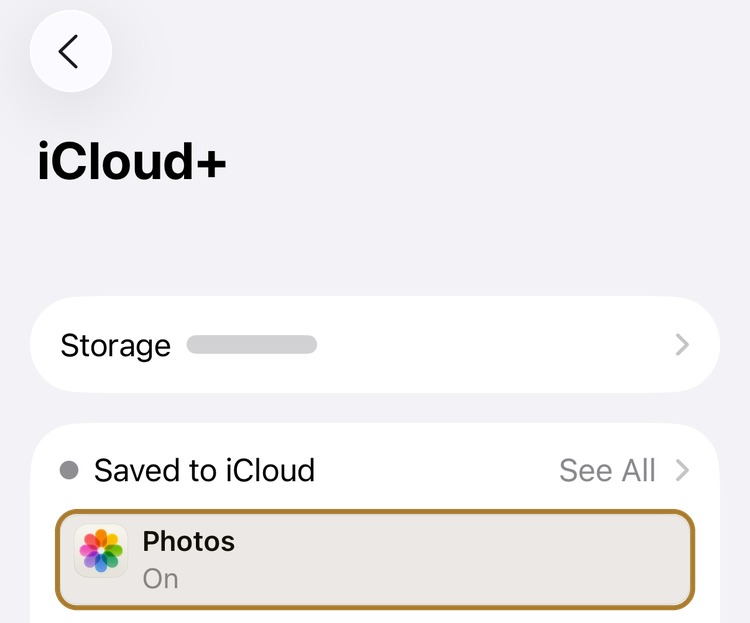
Photos is On. That is iCloud Photos. Tap Photos to see Sync this iPhone.
Apple's Hidden album article says that if you use iCloud Photos, the photos you hide on one device are hidden on your other devices too. The iOS 27 user guide says the same. Hide on one device, hide on all of them.
That is album behavior inside one library. The photo is still in Photos. The hidden mark is part of that library, so it travels with iCloud Photos. Apple's iCloud data security overview even lists "hidden" as metadata stored with Photos.
To find the album on iPhone, open Photos, tap Collections, then Hidden under Utilities. Full path: How to find hidden photos on iPhone.
| Setting | Do hidden photos sync? | What you get |
|---|---|---|
Sync this iPhone off |
Not from this iPhone |
Existing copies stay in iCloud. Other devices can keep syncing. iCloud Backup may include Photos if that backup is on |
Sync this iPhone on |
Yes |
The Hidden album on every device signed into that Apple Account that also uses iCloud Photos. iCloud.com too, when web access is on |
Turn Off and Delete Photos |
Stops, then deletes after 30 days |
Account-wide. Download originals first |
You can open the Hidden album in a browser when iCloud.com access is on. Go to icloud.com/photos, sign in, select Hidden in the sidebar, then select Show Hidden Photos.
Apple's iCloud.com Photos guide treats the Hidden album as another album in the same library. You can hide and unhide there. A Face ID prompt on your iPhone does not apply in the browser.
You can turn off web access in iCloud settings. If Advanced Data Protection is on, Apple turns off iCloud.com data access by default. You can turn web access back on. Until web access is on, the Hidden album on the web is not available, even though the library can still sync to your devices.
Anyone who can unlock another device signed into that Apple Account and using iCloud Photos can open the Hidden album there.
On iPhone and iPad, Apple unlocks the Hidden album with Face ID, Touch ID, or the device passcode. On a Mac, Apple unlocks it with Touch ID or the Mac login password. The album is off in the Mac sidebar until you choose View, then Show Hidden Photo Album.
That is why a signed-in iPad or Mac is a different risk from someone scrolling Library on your locked iPhone. The Hidden album stays locked on those other devices, but each device uses its own Face ID, Touch ID, or passcode.
Family Sharing is not the same as sharing one Apple Account. Each person has their own Apple Account. Apple documents the Hidden album following iCloud Photos across devices on the same account. A Shared Photo Library is a separate case, below.
When iCloud Photos is on, the Hidden album syncs with the library. Apple does not include those photos in iCloud Backup.
iCloud Photos is the library in the cloud. iCloud Backup is a device backup. Apple says that when iCloud Photos is on, photos and videos sync to iCloud and are not included in the daily iCloud Backup. If iCloud Photos is off, iCloud Backup may include the Photos library, including the Hidden album. A computer backup follows the same split: it does not include data already synced to iCloud, including iCloud Photos.
| Path | What happens to the Hidden album |
|---|---|
iCloud Photos on |
The Hidden album syncs with the library. Apple does not also put those photos in iCloud Backup. |
iCloud Photos off, iCloud Backup on |
iCloud Backup may include Photos, including the Hidden album. |
Turning off iCloud Backup does not take the Hidden album out of iCloud Photos. Turning off Sync this iPhone stops this device from syncing the library, including the Hidden album. It does not delete photos already in iCloud.
Yes. The Hidden album is part of the Photos library, so it moves with the library and stays hidden on the new iPhone.
If iCloud Photos is on, a new iPhone signed in to the same Apple Account downloads the library from iCloud, including the Hidden album. Quick Start can also transfer directly from the old phone, or download from iCloud.
If you restore from a computer backup while iCloud Photos is on, the backup file does not contain those photos. The Hidden album comes back from iCloud Photos after the restore, not from the backup. If iCloud Photos is off, the photos travel with the backup or the direct transfer instead.
Either way, hiding does not leave photos behind on the old phone, and it does not keep them off the new one. The new iPhone opens the Hidden album with its own Face ID, Touch ID, or passcode.
It changes who holds the iCloud Photos keys. The Hidden album still syncs when iCloud Photos is on.
Apple encrypts iCloud Photos in transit and at rest in every case. Standard data protection is the default. Those Photos keys sit in Apple data centers, so Apple can help you recover the library. Advanced Data Protection is optional. Your trusted devices keep the keys, and Apple states it cannot access that data.
Neither setting takes a hidden photo out of the library. Neither one gives the Hidden album a key apart from Face ID, Touch ID, or the device passcode. To see which setting you have: Settings → [your name] → iCloud → Advanced Data Protection.
There is no switch that syncs the rest of the library and skips the Hidden album. Turning off Sync this iPhone stops this device. It does not delete photos already in iCloud.
Open Settings, tap your name, tap iCloud, tap Photos, then turn off Sync this iPhone. Apple then asks whether to keep photos on this iPhone. New uploads, edits, and deletions no longer sync to this device. Photos already in iCloud stay there. Other devices can keep syncing.
Keep iCloud Photos on if you still want the rest of the camera roll online. Import the photos that should not sync out of Photos first. Match the count, open the imported files, and choose or create a second copy before you delete the Photos copies, then remove them from Recently Deleted. Full sequence: Keep files out of Photos.
This is a separate Apple process. Download originals first. Open Settings, tap your name, tap iCloud, tap Storage, tap iCloud Photos, then tap Turn Off and Delete Photos. If you own a Shared Photo Library, Apple tells you to delete that library first. Photos and videos stored in iCloud are deleted 30 days later. You can undo during that period.
Turning off Show Hidden Album (on iOS 27: Hidden Album, under Settings → Apps → Photos → Albums) only hides the row under Utilities. The photos stay in the library, so they still sync. Locking the Hidden album with Face ID does the same: it adds a prompt on that device. It does not stop iCloud Photos.
Use the Hidden album when you only need a photo out of Library. Use ArkWarden when the file should not sit in the Photos library that iCloud Photos syncs.
| Apple Hidden album | ArkWarden | |
|---|---|---|
Still in Photos |
Yes. Hiding changes the album, not the library. |
No. Files sit outside Photos. |
iCloud Photos |
Syncs when iCloud Photos is on |
Does not sync through iCloud Photos |
What opens it |
Face ID, Touch ID, or the device passcode |
Your pattern, or the recovery phrase you hold. Not the device passcode. |
Account |
Your existing Apple Account |
No ArkWarden account or ArkWarden server |
Cloud copy |
The Photos library, if iCloud Photos is on |
Optional. Backup is off by default. If you turn it on, it is encrypted on the device first. |
Best for |
Photos you only need off Library, on devices you still control |
Photos, videos, and documents that should stay unreadable without your key |
Keep the Hidden album for photos that only need to stay out of Library, other albums, and the Photos widget.
Import the ones that should not follow iCloud Photos into ArkWarden. Each file is encrypted on the device with AES-256-GCM. On the home screen, tap +, then Photos. Match the count, then open the imported files. Opening one file does not prove the rest imported. If you want a second copy, turn on the optional encrypted iCloud backup, or export an encrypted backup file, before you delete anything. Then delete the Photos copies, then remove them from Recently Deleted. Full import steps: How to find hidden photos on iPhone. Hiding versus encrypting: five methods for hiding photos.
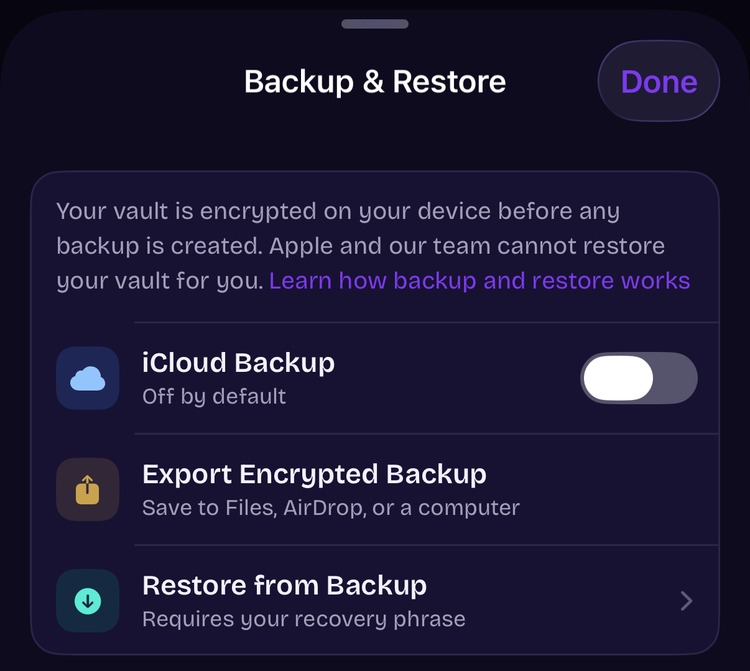
In ArkWarden, iCloud Backup is off by default. The vault is encrypted on the device before any backup is created. Details: Backup and Restore.
Sync, backup, iCloud.com, Shared Photo Library, and key-holding claims come from Apple's current documentation.
Every file encrypted on your device, outside the Photos library. No account, no ads, no server. Optional backup is off until you turn it on.