Your pattern is what unlocks your vault.
A random master key encrypts your files.
You draw a pattern on a 5x5 grid. ArkWarden uses that pattern, with your iPhone's Secure Enclave, to unlock a random 256-bit master key that encrypts every file in your vault. There is no password to remember, and no PIN that only controls access without adding a separate vault key.
From a pattern to encryption, in four steps.
Apps that only lock a screen do not document a separate vault key on top of iPhone Data Protection. ArkWarden uses your pattern to unlock a random master key that encrypts and decrypts the data itself. Here is what happens between your finger and the encrypted file on disk.
Pattern
Shape you draw
PBKDF2 + SE
Unlock path
Master key
Random 256-bit
AES-256-GCM
File encryption
You draw your pattern
You connect dots on a 5x5 grid. ArkWarden records which dots you touch and the order you touch them in. That sequence is your pattern.
The 5x5 grid gives you more room to create a long pattern than a six-digit passcode. New patterns must visit at least six different dots and make at least two direction changes. Every added dot increases the number of possible sequences.
ArkWarden builds the unlock key
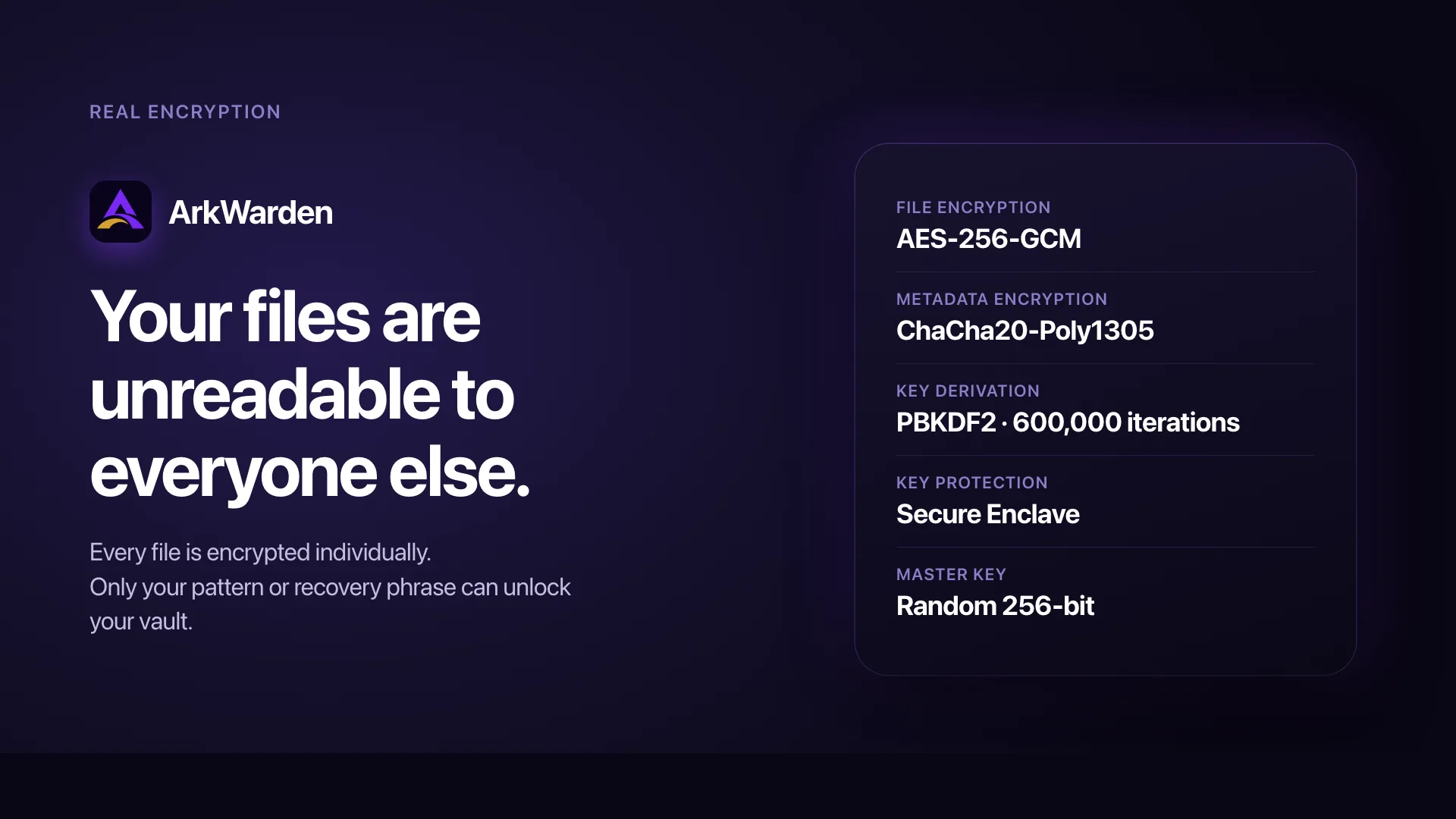
ArkWarden runs your pattern through PBKDF2 with a random salt unique to your vault, then combines the result with a secret from your iPhone's Secure Enclave. Together, they unlock your master key. Your vault's master key is a random 256-bit key created when you set up the vault.
- The salt is generated when you create the vault and stored in the iOS Keychain.
- Two people who somehow draw the same pattern still produce different unlock material because their salts are different.
- The hashing rounds are intentionally slow. You only draw your pattern once per session. An attacker trying large numbers of guesses must repeat the same expensive process every time.
- Current pattern protection also needs a Secure Enclave key from your iPhone. Because that key cannot be exported, copied vault data alone cannot complete pattern unlock on another device.
Your files get encrypted
ArkWarden uses the master key to encrypt every file you import. Photos, videos, documents, audio. Each file is encrypted with AES-256-GCM, the same authenticated encryption used inside TLS 1.3. You can also add a second factor for another authentication step after the pattern succeeds.
Each file also gets a unique nonce, the small random value that AES needs to keep two identical files from producing the same ciphertext. Two copies of the same photo, encrypted with the same key, will still produce two completely different encrypted files on disk.
The metadata that organises your vault (category names, file titles, ordering) is encrypted with ChaCha20-Poly1305. It is the same authenticated style of encryption, tuned for the small structured data that an index needs.
The key disappears
When you lock the vault or close the app, the unlocked master key is released from memory. It is not written to disk. It is not cached. It is not kept for later use.
The next time you draw your pattern, ArkWarden rebuilds the unlock key with your pattern and your iPhone, then unlocks the master key again. Your files decrypt. Draw a different pattern and unlock fails. The data remains unreadable.
Why this is not the same as a PIN, a hidden album, or a cloud vault.
Plenty of apps will hide your files. A much smaller number will actually encrypt them.
| A screen-only PIN | Apple Hidden album | A cloud-based vault | ArkWarden | |
|---|---|---|---|---|
| What the input does | Controls access. Does not add a separate vault key | Moves files into another album | Uploads files, then encrypts on the server | Derives the key that unwraps your vault key |
| How many guesses to break it | 10,000 | Not relevant. The Hidden album does not add a separate key. | Depends on the provider's design and account security | PBKDF2 and device-bound key material protect each attempt |
| Where your files live | On the device. Data Protection still encrypts them. The PIN does not add a separate key. | In Photos on the device. Data Protection still encrypts them. | On someone else's servers | On your device, encrypted |
| Who else can read them | Anyone with the unlock code or device access | Anyone who unlocks the album with Face ID, Touch ID, or the device passcode | The provider, and anyone it gives keys to | Only a completed vault unlock or your recovery phrase |
| Recovery if you forget | Reset and lose nothing | There is nothing to recover | Account reset, often by email | A 12 or 24-word recovery phrase you control |
A PIN protects access. Encryption protects the data.
A PIN controls access. iPhone Data Protection still encrypts files on the device with per-file keys. A screen PIN does not add a separate vault key. Encryption works differently. The data is stored under a key that only the correct input unlocks, and it remains unreadable until that key is provided.
The Hidden album is not the same as encryption.
The Apple Hidden album and many "vault" apps move files into a private list. iPhone Data Protection still encrypts those files with per-file keys. The Hidden album does not add a documented separate vault key. The album opens with Face ID, Touch ID, or your passcode. ArkWarden encrypts each file with a random master key that your pattern unlocks, not with the device passcode. Without that key, the vault contents are computationally infeasible to recover. How the Hidden album works in Photos: hidden photos on iPhone. Whether they sync: Do hidden photos sync to iCloud?
A second copy is safe only if the key never leaves your device.
Cloud vaults provide synchronisation, but they also create an additional place where encrypted data is stored. The provider holds at least your encrypted files and, in some systems, the keys required to recover them. ArkWarden has no server and no account system of its own. Your encrypted files stay on your device, and if you enable the optional iCloud Backup, only you hold the key that opens it.
What is actually happening, in the language of cryptography.
You do not need any of this to use ArkWarden. We include it so anyone who wants to verify what we say can match our claims against the standards that support them. See how encryption fits into the full security design.
| Part | Algorithm | Why this one |
|---|---|---|
| Key derivation from pattern | PBKDF2 |
Standardised by NIST (SP 800-132) and implemented with CommonCrypto. ArkWarden uses 600,000 iterations. |
| Key derivation from recovery phrase | PBKDF2 |
The phrase and pattern use separate methods to open the same random master key. |
| File encryption | AES-256-GCM |
The authenticated encryption standard used in TLS 1.3 and IPsec. Detects tampering as part of decryption. |
| Metadata encryption | ChaCha20-Poly1305 |
The other authenticated cipher used in TLS 1.3 and WireGuard. Well suited to the small structured payloads a category index produces. |
| Salt generation | Apple's secure random source (Security framework) | Generated once per vault. Stored in the iOS Keychain. Unique even across two devices that share a pattern. |
| Recovery phrase | BIP-39 English wordlist, 12 or 24 words | The same wordlist used by hardware wallets. Generated using Apple's secure random source. |
Why 600,000 iterations? OWASP sets this as the recommended minimum for PBKDF2. Each unlock attempt requires that full computation. On a modern iPhone it takes under a second. For an attacker testing millions of guesses, the total computation time increases to years.
Where the secrets live
On disk: Only ciphertext. File data encrypted with AES-256-GCM. The category index encrypted with ChaCha20-Poly1305.
In the iOS Keychain: The salt for key derivation, and the master key encrypted for pattern unlock and separately for your recovery phrase. Pattern unlock also needs a Secure Enclave key on that iPhone. These items are stored so they cannot be read while the device is locked and cannot be restored to a different device.
On Apple's servers: Nothing, unless you turn on iCloud Backup. ArkWarden has no account system and no telemetry on file contents. A backup stores only an encrypted copy in your own iCloud, which is unreadable without your recovery phrase.
In memory: ArkWarden keeps an active reference to the decrypted master key while your vault is unlocked. It releases that reference when you lock the app.
Hardware backing
Every iPhone that ArkWarden supports has a Secure Enclave. This is a separate security chip that can use keys the rest of the phone cannot read.
When you set up your vault, ArkWarden creates a key inside the Secure Enclave. From then on, every pattern unlock uses it. Your pattern still goes through PBKDF2. ArkWarden then combines the result with a secret that only the Secure Enclave in your iPhone can produce. Together, they unlock your master key.
Your pattern alone is no longer enough to unlock your vault. Your iPhone must be present too. The key inside the Secure Enclave cannot be copied out by an attacker, by Apple, or by us. This ties pattern unlock to your phone, not only to something you know.
The Secure Enclave is built to protect keys, not to encrypt large files. Your files are encrypted with AES-256-GCM. Your category index is encrypted with ChaCha20-Poly1305. Both use Apple's CryptoKit. Each part does the job it is built for.
Your recovery phrase works differently by design. It restores your vault on a new iPhone, so it cannot depend on the Secure Enclave in your old one. A 12 or 24 word BIP-39 phrase has far too many combinations to guess in practice. This is why it can safely protect restore.
The threats this design defeats
Brute force against the pattern
Current pattern protection needs a non-exportable Secure Enclave key from your iPhone. Copied vault data alone cannot complete pattern unlock on another device because that key cannot be copied or moved. On your iPhone, ArkWarden waits 15 minutes after 10 failed attempts.
Smudge inspection
The trail of fingerprints on the screen reveals which dots were touched but not the order, direction, or connections between them. On a 5x5 grid the number of orderings consistent with any given smudge is large.
Device seizure
With no pattern and no recovery phrase, the on-disk data is ciphertext. There is no stored hash that directly confirms whether a guess is correct. Every guess has to attempt decryption before the attacker can evaluate the result.
Screenshot or screen recording of your files
Your vault is protected. ArkWarden hides its own screens from screenshots and screen recordings, including the unlock screen, your file list, and any file you open. Screens that iOS itself draws, such as the system share sheet, are outside an app's control.
Network interception
ArkWarden does not send your files anywhere on its own. If you turn on iCloud Backup, only AES-256-GCM-encrypted data travels to your own iCloud, so a network attacker intercepts nothing readable.
What ArkWarden does not promise
- It cannot protect you from someone who is looking over your shoulder while you draw your pattern in public.
- It cannot recover your files if you lose both your pattern and your recovery phrase. That is the entire point. If we could recover them, so could a court order, a stolen backup, or a determined attacker.
Answers to what people usually ask next.
Why should I trust ArkWarden with private files?
Can ArkWarden read the files in my vault?
What happens if someone copies my encrypted vault data?
How does ArkWarden protect pattern unlock on my iPhone?
Can a pattern be strong enough for encryption?
Is my pattern stored on the device?
What if I use the same pattern on another vault or iPhone?
Can I still restore my vault on a new iPhone?
What happens if I forget my pattern?
Can Apple or iCloud see my backup?
Standards and specifications referenced on this page.
The cryptographic claims on this page are based on published standards from recognized bodies. Each link points to the primary source.
- NIST SP 800-132. Recommendation for Password-Based Key Derivation. National Institute of Standards and Technology. nvlpubs.nist.gov
- NIST SP 800-38D. Recommendation for Block Cipher Modes of Operation: GCM. National Institute of Standards and Technology. csrc.nist.gov
- FIPS 197. Advanced Encryption Standard (AES). National Institute of Standards and Technology. csrc.nist.gov
- RFC 7539. ChaCha20 and Poly1305 for IETF Protocols. Internet Engineering Task Force. datatracker.ietf.org
- BIP-39. Mnemonic wordlist standard for generating deterministic keys. bips.dev/39
- FIDO2. Standard for hardware-backed authentication, used by ArkWarden with YubiKey over NFC. fidoalliance.org
- OWASP Password Storage Cheat Sheet. PBKDF2 iteration count recommendations. Open Web Application Security Project. cheatsheetseries.owasp.org
Situations where encryption matters.
Give your files real encryption.
Not just a lock screen.
Draw a pattern. Unlock a random 256-bit master key. Encrypt the files you want to keep private, on your device, with no account and no server.

Point your camera at the code.