Last updated: September 2026
The Apple Hidden album hides a photo from view. It adds no separate encryption key, and it opens with the same passcode that unlocks your iPhone. ArkWarden encrypts every photo on the device with AES-256-GCM, under a key only your pattern or recovery phrase can unlock, so the file itself stays unreadable even to someone who knows your passcode.
To hide a photo or video on iPhone, touch and hold it in Library or in an Album, then tap Hide. To unhide a photo or video, open the Hidden album (Photos, then Collections, then Utilities), touch and hold it, then tap Unhide. The Apple Hidden album adds no separate encryption key. See Apple Hidden album or ArkWarden below for what does.
Touch and hold the photo or video in Library or an album, then tap Hide. The same steps hide a video.
We tested this ourselves on a physical iPhone running iOS 27 and a second physical iPhone running iOS 26, both in September 2026. Hide works the same way on both, but the menu looks different between the two versions.
In Library or any album, touch and hold the thumbnail. A menu opens over the grid.
On iOS 27, Hide sits in the top icon row, next to Copy and Duplicate. On iOS 26, Hide sits lower in the same menu, in the plain list.
iPhone explains that the photo moves to the Hidden album and can still be found there. Tap Hide Photo. The photo or video leaves Library, other albums, and the Photos widget.
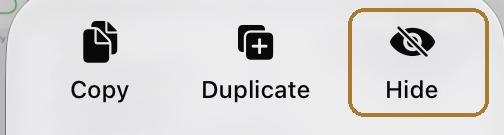
Touch and hold the thumbnail, then tap Hide.
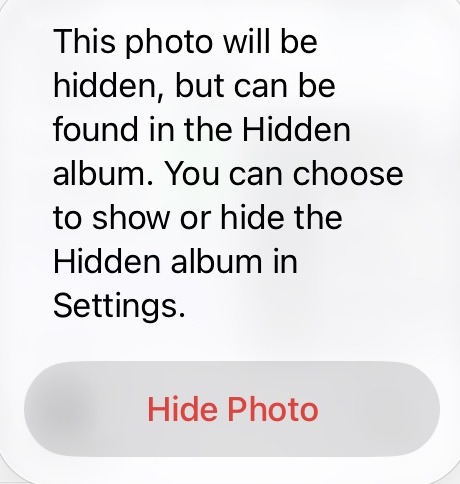
Tap Hide Photo to confirm.
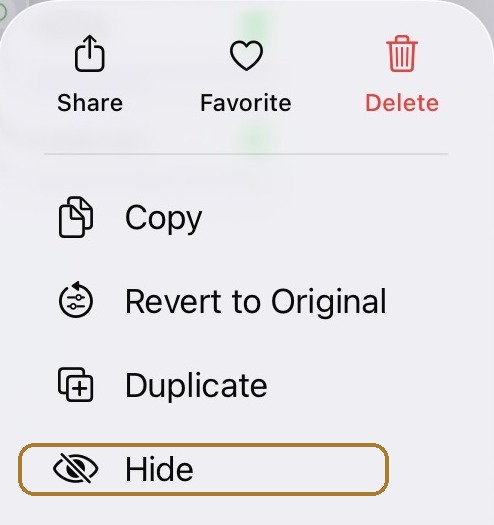
On iOS 26, Hide sits lower in the same menu.
Same confirm dialog as iOS 27.
Videos hide the same way as photos: touch and hold, then tap Hide. There is no separate step for video. To hide several at once, tap Select in Library, tap each photo or video, then touch and hold any one of the selected thumbnails to bring up the same menu. On both iOS versions, the tap sequence and confirm dialog are the same, and only the menu position changes. The confirm button reads "Hide Photo" for a photo and "Hide Video" for a video, or "Hide N Photos" / "Hide N Videos" for a multi-select of N items.
Open the Hidden album, touch and hold the photo or video, then tap Unhide.
Also tested on both our physical iOS 27 and iOS 26 iPhones, September 2026. Unhide works the same way on both, but sits in a different spot in the menu: the top icon row on iOS 27, the plain list on iOS 26.
Collections → Utilities → Hidden → View Album, then Face ID, Touch ID, or your passcode. See how to find hidden photos below if the album is not listed.
The same menu opens, with Unhide in place of Hide.
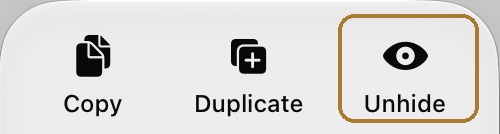
Touch and hold, then tap Unhide. No confirmation step.
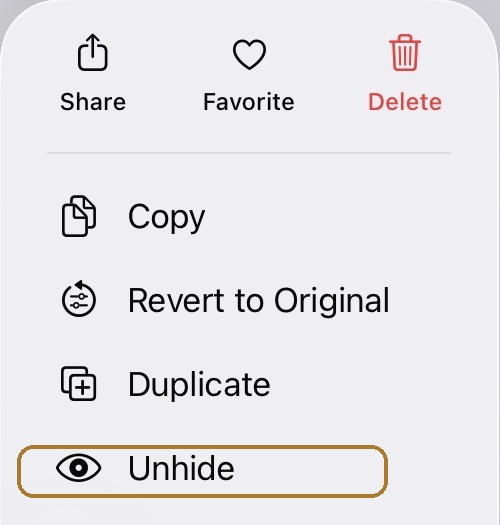
On iOS 26, Unhide sits lower in the same menu.
Unhiding returns the photo or video to Library and any albums it was in before you hid it. To unhide several at once, tap Select inside the Hidden album, tap each item, then touch and hold any one of them.
The Hidden album is in the Photos app under Collections, then Utilities, then Hidden.
Tap View Album, then use Face ID, Touch ID, or your passcode. Screenshots are from iOS 27 on iPhone, September 2026. The same Collections path works on iOS 18 to iOS 26.
Hidden photos are not in a separate app. They stay inside Photos.
Use the bar at the bottom of the screen. Collections is the middle button, next to Library. On iOS 17 and earlier, tap Albums instead, then scroll to Utilities.
Hidden sits with Recently Deleted, Duplicates, and Recently Saved (on iOS 18 to iOS 26: Deleted, Duplicates, and Saved). The Hidden button shows a crossed-out eye and a lock.
Apple unlocks Hidden the same way you unlock your iPhone: Face ID, Touch ID, or your passcode.
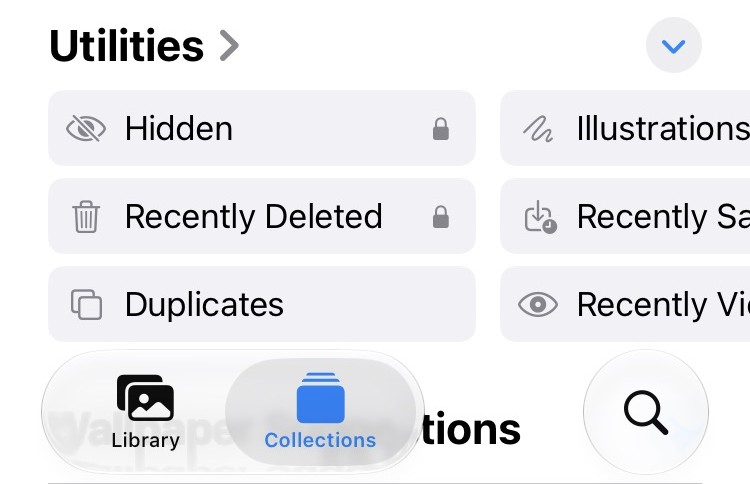
Tap Collections. Hidden sits under Utilities, with a lock on the button.
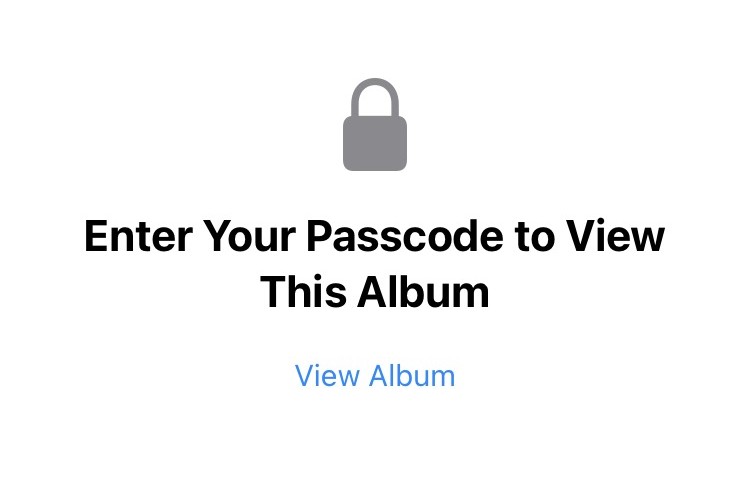
Tap View Album, then Face ID, Touch ID, or your passcode.
Apple's wording is direct: hidden photos move to the Hidden collection, and you cannot view them anywhere else in Photos. That includes Library, other albums, and the Photos widget. The photos are still in the Photos library. They have changed albums, not storage.
They are usually still on the phone. On iOS 27, turn on Hidden Album in Settings, then Apps, then Photos, then Albums. On iOS 18 to iOS 26, the switch is Show Hidden Album, directly under Photos.
Turning the album off in Settings removes it from Utilities. The photos stay on your iPhone.
Apple lets you remove the Hidden album from the Photos app without deleting anything. When the switch is off (Hidden Album on iOS 27, Show Hidden Album on iOS 18 to iOS 26), the photos stay in the library and stay hidden from Library. They simply stop appearing under Utilities until you turn the switch back on.
On iOS 27, open Settings → Apps → Photos → Albums and turn on Hidden Album. The caption under it reads "Allow the Hidden, Recently Viewed, and Recently Shared albums to appear under Utilities." We checked this on an iPhone in September 2026. At the time, Apple's iOS 27 user guide still showed the older path.
On iOS 18 to iOS 26, open Settings → Apps → Photos and turn on Show Hidden Album, as in Apple's Hidden album article. The caption on that switch is "The Hidden album will appear under Utilities."
To lock the album, turn on the switch above it. It is named after how your iPhone unlocks: Use Face ID, Use Touch ID, or Use Passcode. Hidden then asks for it when you tap View Album.
1 · Settings → Apps → Photos
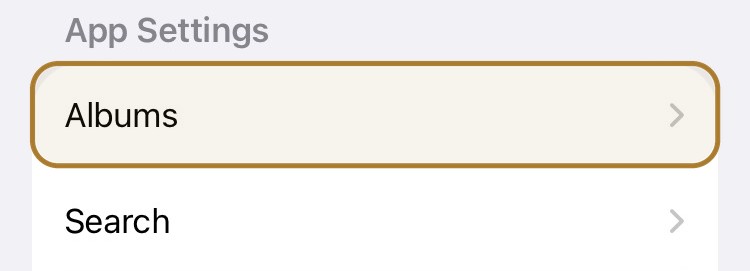
2 · Albums
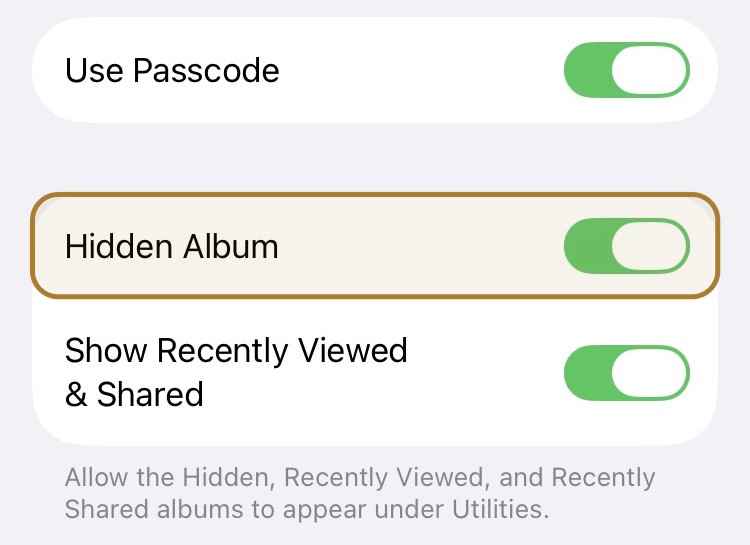
Tap Albums, then turn on Hidden Album. The switch above it locks the album. It says Use Face ID, Use Touch ID, or Use Passcode, depending on how your iPhone unlocks.
Settings → Apps → Photos
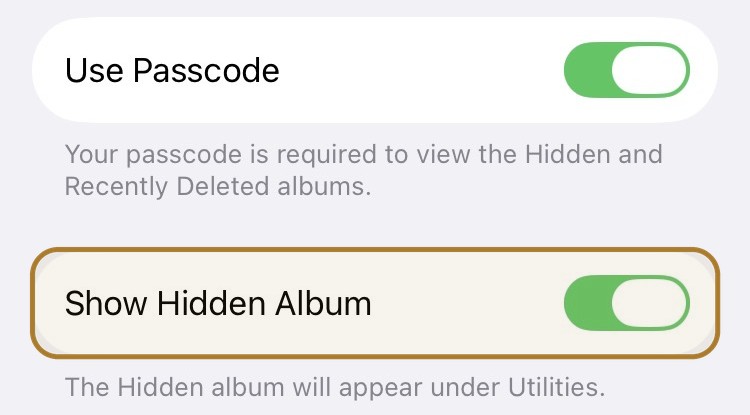
Turn on Show Hidden Album. The switch above it (Use Face ID, Use Touch ID, or Use Passcode) locks the album.
If the Apple Hidden album is visible and still empty, check two other places before assuming the photos left the phone:
Yes. When iCloud Photos is on, hidden photos sync with the rest of the library and stay hidden on every device signed into that Apple Account.
Apple's Hidden album article says photos you hide on one device are hidden on your other devices too. Apple's iPhone User Guide says the same for iCloud Photos: hide on one device, hide on all of them.
Hiding does not create a private copy outside iCloud. The hidden flag travels with the library. If iCloud Photos is on, anyone who can open Photos on another device signed into that Apple Account, and who can pass Face ID, Touch ID, or the passcode there, can open the Hidden album there as well.
Apple encrypts iCloud Photos in transit and at rest in every case. What changes is who holds the keys:
| iCloud setting | Do hidden photos sync? | Who holds the Photos keys? |
|---|---|---|
Sync this iPhone off |
This iPhone stops new changes. Copies already in iCloud can remain. Other devices can keep syncing |
Keys still apply to any copies already in iCloud |
Standard data protection Default |
Yes. The Hidden album is on every device in the account |
Apple data centers, so Apple can help you recover the library |
Advanced Data Protection Optional, off unless you turn it on |
Yes. The Hidden album still syncs |
Your trusted devices. Apple states it cannot access that data |
Advanced Data Protection changes who can read iCloud Photos. It does not change what hiding does: the photo stays in Photos. If iCloud Photos is on, it still syncs, and the Apple Hidden album still opens with Face ID, Touch ID, or your passcode. To see which setting you have: Settings → [your name] → iCloud → Advanced Data Protection.
iCloud.com, iCloud Backup versus iCloud Photos, Shared Photo Library, and how to stop the sync: Do hidden photos sync to iCloud?
Yes, if they can unlock the iPhone. If iCloud Photos is on, they can also open the Hidden album on another device signed into the same Apple Account.
Apple unlocks the Hidden album with Face ID, Touch ID, or the iPhone passcode. That is the same authentication that unlocks the device. Anyone who can unlock your iPhone can open the Hidden album. If iCloud Photos is on, anyone who can unlock another device signed into the same Apple Account can open the Hidden album there too.
That is why locking hidden photos in Settings is not the same as a vault. The Use Face ID, Use Touch ID, or Use Passcode switch adds a prompt. It does not give you a key the device passcode cannot reach.
ArkWarden does not open with the iPhone passcode. The vault opens with your pattern, or the recovery phrase you hold. You can add a YubiKey over NFC as a second factor after the pattern. Wing is a second vault with its own pattern, if you need a separate set of files.
Hidden photos are encrypted on your iPhone by Data Protection, like every other file. The Hidden album does not add a documented separate key. It opens with the same Face ID, Touch ID, or passcode that opens the phone.
A screen lock controls what Photos displays. The album is harder to open by accident. It is not a vault.
Apple's own pages describe hide, lock, and show. They do not describe an extra encryption step for the Apple Hidden album. iPhone Data Protection already encrypts files on the device with unique per-file keys. It is an album that is harder to open by accident, not a vault.
| Situation | What the Apple Hidden album does |
|---|---|
Someone scrolling Library |
Stops this. Apple keeps hidden items out of Library, other albums, and the Photos widget. |
Someone who knows the iPhone passcode |
Does not stop this. The same passcode opens the Apple Hidden album. |
Someone enrolled in Face ID or Touch ID on that phone |
Does not stop this. Biometrics unlock Hidden the same way they unlock the device. |
iCloud Photos on another device |
Does not stop this. When iCloud Photos is on, the Hidden album follows the Apple Account. |
Turning the Hidden album off in Settings |
Hides the album row. The photos stay in the library. |
The file itself becoming unreadable |
The files stay in the Photos library. Data Protection still encrypts them with per-file keys. The album opens with Face ID, Touch ID, or your passcode. |
The Settings screen above makes the split obvious. The Hidden Album switch (Show Hidden Album on iOS 18 to iOS 26) decides whether the album shows. The Use Face ID, Use Touch ID, or Use Passcode switch adds the prompt. Neither one takes the file out of Photos. Neither one gives you a key that only you hold.
Use the Apple Hidden album when you only need a photo out of Library. Use ArkWarden when the file itself should be unreadable without a key you hold.
| Apple Hidden album | ArkWarden | |
|---|---|---|
Out of Library |
Yes. Also out of other albums and the Photos widget. |
Yes. Files sit outside the Photos app. |
Key independent of the device passcode |
Not documented. The album opens with Face ID, Touch ID, or the iPhone passcode. |
Yes. AES-256-GCM on the device, unlocked by your pattern. |
What opens it |
Face ID, Touch ID, or the iPhone passcode |
Your pattern, or the recovery phrase you hold. Not the device passcode. |
iCloud Photos |
Still syncs when iCloud Photos is on |
Not in the Photos library, so it does not sync through iCloud Photos |
Account |
Your existing Apple Account |
No ArkWarden account or ArkWarden server |
Best for |
A phone you still control, and a person who will not unlock it |
Photos, videos, and documents that must stay unreadable without your key |
The Apple Hidden album moves a photo out of view. It adds no separate key. Anyone who can unlock your iPhone can open the Hidden album, and if iCloud Photos is on, so can anyone who unlocks another device signed into your Apple Account.
ArkWarden encrypts the file itself with AES-256-GCM, unlocked by a pattern only you hold, not your iPhone passcode. That covers the casual case (someone scrolling your unlocked phone) and the case the Hidden album cannot cover (someone who has your passcode, or a device on your Apple Account). Hiding and encrypting are not the same method.
On the ArkWarden home screen, tap +, then Photos.
Draw your pattern and write down the recovery phrase. There is no ArkWarden account to create.
On the ArkWarden home screen, tap the + button, then tap Photos. Choose the photos for the vault. Each file is encrypted on the device as it enters the vault.
Check that the vault contains every photo you selected. Match the count, then open the files in ArkWarden. Opening one file does not prove the rest imported.
ArkWarden backup is off by default. If you skip it, the vault stays only on your device. Before you empty Recently Deleted, turn on the optional encrypted iCloud backup, or export an encrypted backup file, if you want a second copy. Both are encrypted on the device first. Details: Backup and Restore.
Delete the originals from the Apple Hidden album, then delete them again from Recently Deleted so a readable copy does not remain in Photos or iCloud Photos. After that, the vault may be the only remaining copy on the phone.
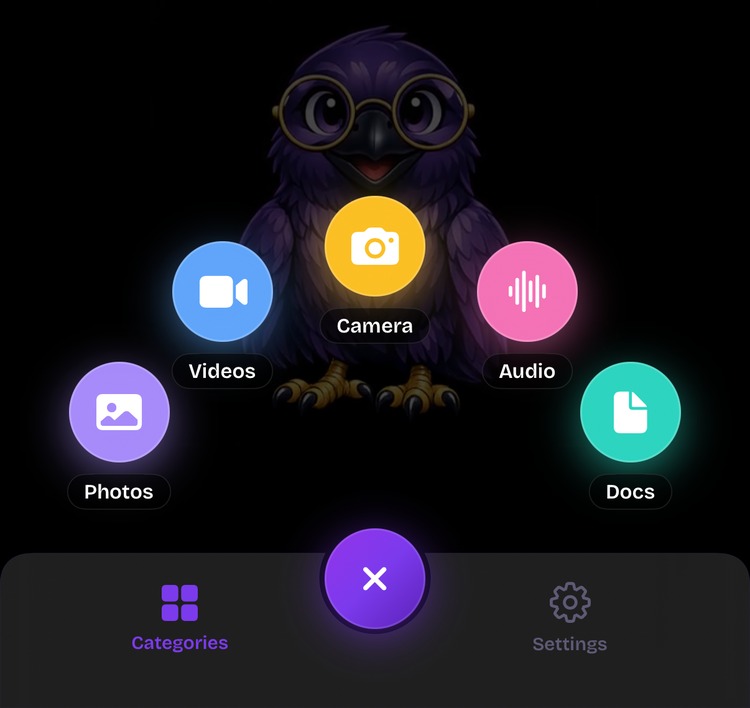
Tap +, then Photos.
The steps above cover the Apple Hidden album because that is what "hide" and "unhide" mean inside Photos. Every case below still ends with your files unlocked by your own pattern instead of your iPhone passcode:
Install, draw a pattern, then tap + and Photos to bring files in. Get the app.
Location, lock, iCloud, Settings, Data Protection, and account-switching claims come from Apple's current documentation.
Every file encrypted on your device, with a random master key unlocked by your pattern. No account, no ads, no server.